Install the test build
An early version of 30 Sundays, before it reaches the store. Thanks for trying it.
Which phone are you using?
Showing the Android steps. Tap iOS if you're on an iPhone or iPad.
Before you start
Do all of this on the Android phone you'll be testing on, not on a laptop.
- If you already have this app from the Play Store, uninstall it first, otherwise the install will fail with a signature error.
- Don't sit on the invite link too long. It expires 30 days after it's sent. If it's expired, message me and I'll send a fresh one.
Set it up
Six steps. Do them in order, on the phone.
-
Install Firebase App Tester
App Tester is Google's app for handing out test builds. Open the download page on your phone and tap the download button to get it.
Download App Tester Opens in a new tab -
Allow Chrome to install it
Your phone will say something like “Chrome isn't allowed to install unknown apps.” Tap Settings, then turn on “Allow from this source.” The install screen then appears on its own. Tap Install.
This warning is normal. Android shows it for anything that didn't come from the Play Store, including Google's own tester app, and you can switch the permission back off when you're done.
The install screen should appear right away, so wait a moment for it. If nothing happens, go back to Chrome, open your Downloads, and tap the downloaded file again. Then tap Install.
What these first two steps look like
A recap of what you just read. Nothing new to do here.
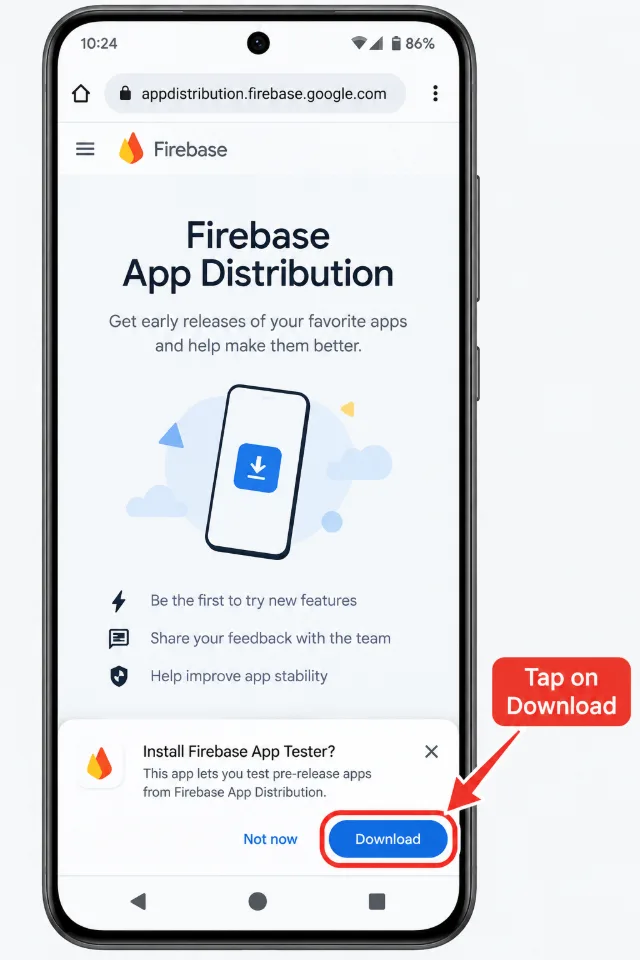 Screenshot not added yetimages/01-app-tester-download.webp
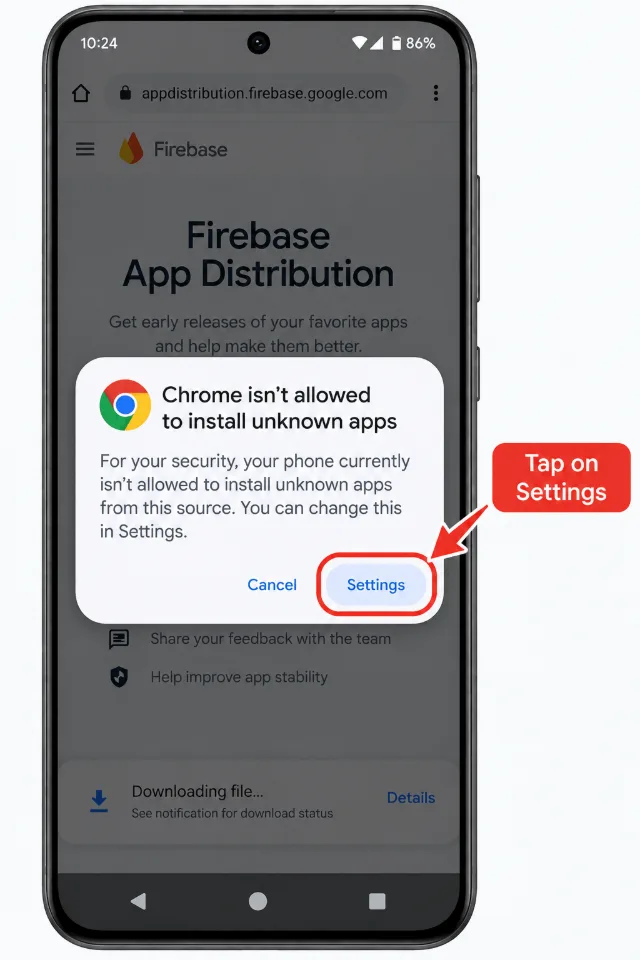 Screenshot not added yetimages/02a-unknown-apps-prompt.webp
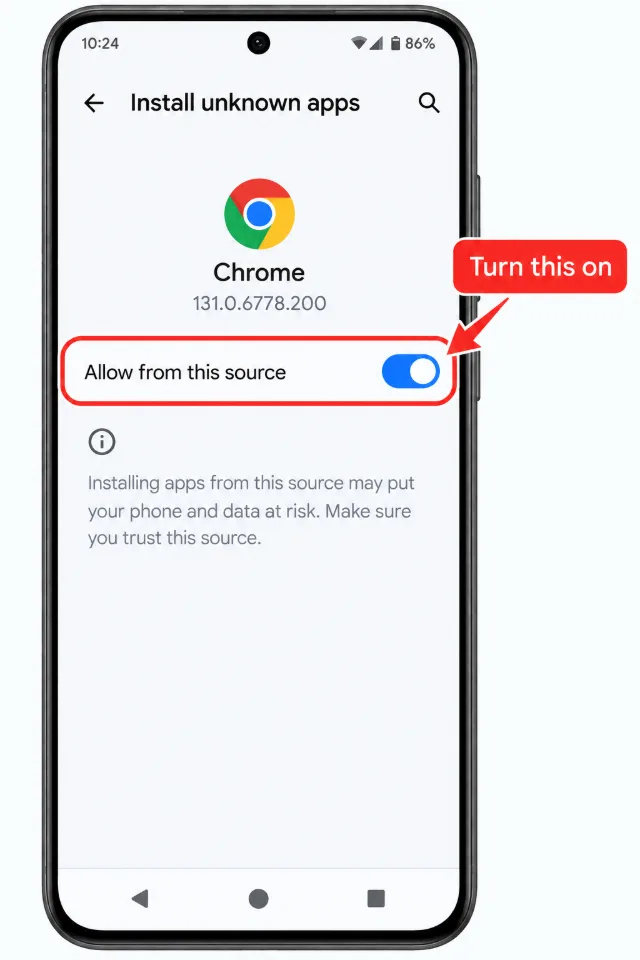 Screenshot not added yetimages/02b-allow-from-this-source.webp
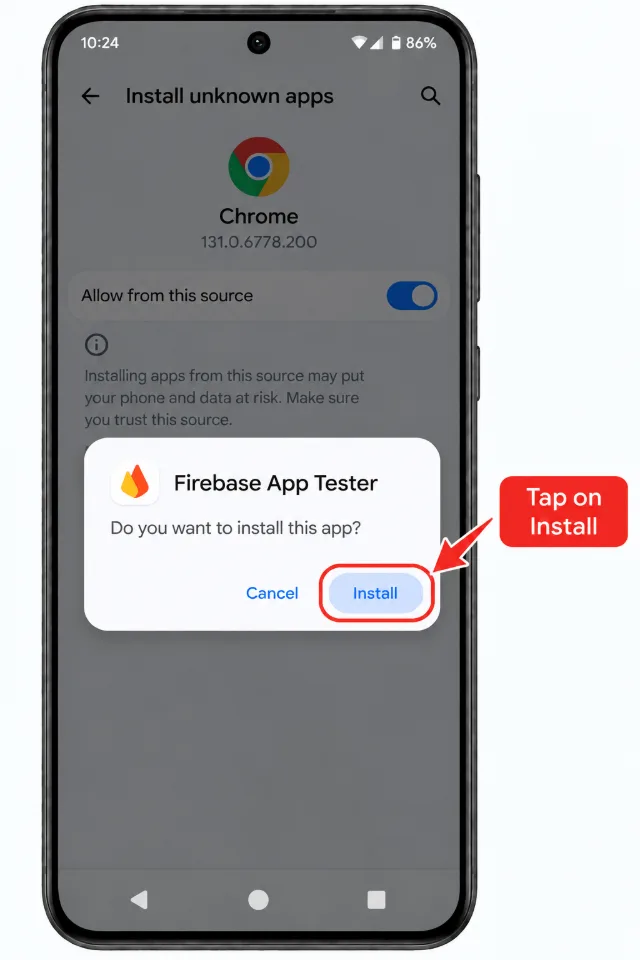 Screenshot not added yetimages/02c-install-dialog.webp
-
Open the invite link
Open the invite link on the same phone and enter the email address you want to use.
Open my invite link Opens in a new tabYou'll then get an email with the invitation. Check your inbox, and your spam folder if it's not there. Open that email, tap the link inside, sign in with the Google account for that email, and tap Accept invitation.
-
Open App Tester and sign in
Open the App Tester app you installed in step 1 and sign in with the same Google account you just used to accept the invite.
Use the same account. If you sign in with a different one, the app won't show up and you'll have to start the invite again.
-
Pick the latest build
You'll see 30 Sundays listed. Tap it, then tap the newest release at the top of the list.
-
Download and install
Tap Download, then Install when it finishes.
If your phone asks about unknown sources again, this time for App Tester, turn the permission on and tap Install again. Same toggle as step 2, different app.
Stuck?
30 Sundays doesn't appear in App Tester
You're probably signed in with a different Google account than the one you accepted the invite with. Sign out and sign back in with the right one.
Install failed, or “App not installed”
You likely have the Play Store version installed. Uninstall it and try again.
The invite link says it's expired
Ask me for a new one. Links expire after 30 days.
You're in
Open 30 Sundays and start poking at it. New builds land in App Tester on their own, and you can switch on its notifications so you know when one arrives.
If something looks wrong, feels slow, or is just annoying, tell me. That's the whole reason you're here, and I'd rather hear it from you than from a stranger in the store.
Before you start
Do this on the iPhone or iPad you'll be testing on, not on a Mac.
- You'll need iOS 16 or later.
Set it up
Three steps. TestFlight does most of the work.
-
Open the TestFlight invite
Tap the button below on your iPhone or iPad.
Open TestFlight invite Opens in a new tab -
Install TestFlight if you don't have it
If you don't already have Apple's TestFlight app, the link will send you to the App Store to get it. Install it, then open the invite link again.
-
Follow the instructions in TestFlight
TestFlight takes it from here. Tap Accept, then Install. It'll tell you exactly what to do.
Stuck?
The link opened a blank page or an error
Open it in Safari on the device itself rather than on a computer or in another app's browser.
TestFlight says the build has expired
Test builds expire after 90 days. Ask me for the latest one.
You're in
Open 30 Sundays and start poking at it. New builds arrive in TestFlight automatically, and it'll notify you when one is ready.
If something looks wrong, feels slow, or is just annoying, tell me. That's the whole reason you're here, and I'd rather hear it from you than from a stranger in the store.